Textplatte nach Ihren Wünschen
Gestalten Sie Text, Logo oder einen vorhandenen Stempelabdruck in einer übersichtlichen Schritt-für-Schritt-Ansicht.
- Live-Vorschau
- Entwurf später erneut verwenden
- Produktionsdatei inklusive
Stempel gestalten
Text, Logo oder alten Abdruck hinzufügen und direkt prüfen.
Gespeicherten Stempel ladenAlten Stempel sauber aufbereiten lassen
?
Am besten ein gerades, gut beleuchtetes Foto des vollständigen Abdrucks. Auch ein Scan oder eine PDF-Datei funktioniert.
Der vollständige Abdruck wird als saubere Schwarz-Weiß-Grafik aufbereitet. Erkannter Text bleibt gezielt editierbar.
PNG, JPG, WebP oder PDF – auch Handyfotos sind möglich.
Bearbeiten Sie den Stempeltext ausschließlich hier. Unsichere Stellen sind markiert.
?
Jeder Zeilenumbruch erzeugt eine neue Stempelzeile. Die mögliche Zeilenzahl sehen Sie direkt unter dem Textfeld.
?
Bei 100 % nutzt Ihr Text automatisch die größtmögliche passende Breite oder Höhe. Sie können ihn anschließend kleiner stellen; über die nutzbare Abdruckfläche kann er nicht hinausgehen.
?
Verwenden Sie möglichst ein scharfes, kontrastreiches Bild ohne Schatten. Das Logo wird automatisch in Schwarz-Weiß umgewandelt.
Kein Logo ausgewählt.
Erweiterte Gestaltung Zeilen einzeln formatieren, Kästchen und Trennlinien
Gesamter Text
?
Ein Rahmen benötigt etwas Platz. Prüfen Sie danach kurz, ob Text und Logo weiterhin vollständig in der Vorschau stehen.
Abstände
Einzelne Zeilen
B = fett, I = kursiv, U = unterstrichen, ☐ = Ankreuzkästchen, AA = Großbuchstaben, — = Trennlinie.
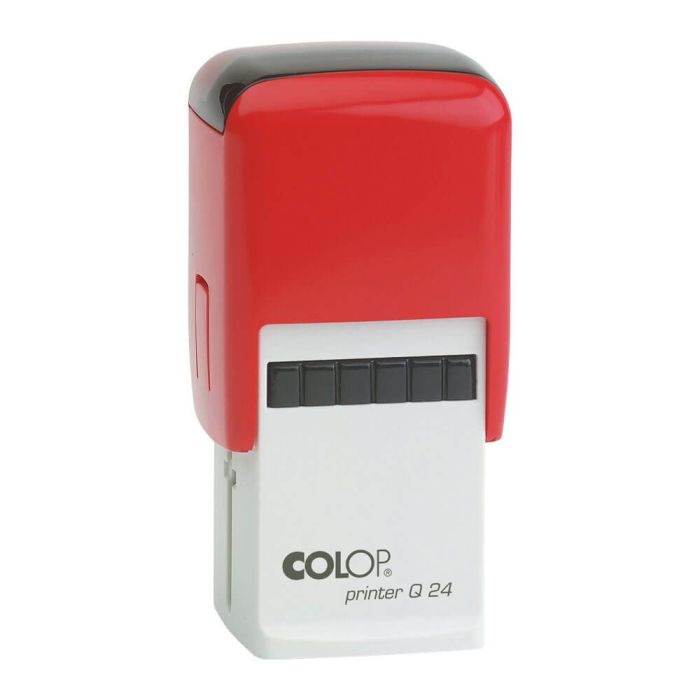
COLOP Printer Q 24 – Individual Self-inking Stamp
The COLOP Printer Q 24 is made with your desired text or logo. The square imprint area of 24 × 24 mm offers space for up to 6 lines.
Individual with Text or Logo
Design the stamp plate with company data, address, contact details, notes or a logo. The maximum number of lines serves as a guide; font size and logo proportion will be adjusted to your design.
Precise and Comfortable
The self-inking mechanism automatically wets the text plate with each stamping process. The transparent bottom supports precise positioning, and the integrated ink pad can be replaced if necessary.
Product Details
- Self-inking text and logo stamp
- Custom-made stamp plate
- Imprint size: 24 × 24 mm
- Square imprint shape
- Up to 6 lines of text
- Housing color: Black, Blue or Red
- Integrated, replaceable ink pad
Finden Sie schnell das passende Ersatzkissen und weiteres Zubehör für dieses Modell.
Passendes Zubehör suchen


COLOP Printer Q 24 – custom stamp , 6 lines 24 × 24 mm · Bis zu 6 Zeilen
COLOP Printer Q 24 – custom stamp 24 × 24 mm, 6 lines
COLOP
Der vielseitige Stempel für Adressen, Logos und individuelle Texte.
- Scharfer Abdruck
- Einfach nachfüllbar
- Schnell gestaltet
Couldn't load pickup availability
Versandfertig in 1–2 Werktagen
COLOP Printer Q 24 – Individual Self-inking Stamp
The COLOP Printer Q 24 is made with your desired text or logo. The square imprint area of 24 × 24 mm offers space for up to 6 lines.
Individual with Text or Logo
Design the stamp plate with company data, address, contact details, notes or a logo. The maximum number of lines serves as a guide; font size and logo proportion will be adjusted to your design.
Precise and Comfortable
The self-inking mechanism automatically wets the text plate with each stamping process. The transparent bottom supports precise positioning, and the integrated ink pad can be replaced if necessary.
Product Details
- Self-inking text and logo stamp
- Custom-made stamp plate
- Imprint size: 24 × 24 mm
- Square imprint shape
- Up to 6 lines of text
- Housing color: Black, Blue or Red
- Integrated, replaceable ink pad
COLOP Printer Q 24 – Individual Self-inking Stamp
The COLOP Printer Q 24 is made with your desired text or logo. The square imprint area of 24 × 24 mm offers space for up to 6 lines.
Individual with Text or Logo
Design the stamp plate with company data, address, contact details, notes or a logo. The maximum number of lines serves as a guide; font size and logo proportion will be adjusted to your design.
Precise and Comfortable
The self-inking mechanism automatically wets the text plate with each stamping process. The transparent bottom supports precise positioning, and the integrated ink pad can be replaced if necessary.
Product Details
- Self-inking text and logo stamp
- Custom-made stamp plate
- Imprint size: 24 × 24 mm
- Square imprint shape
- Up to 6 lines of text
- Housing color: Black, Blue or Red
- Integrated, replaceable ink pad
- Hersteller
- COLOP
- Abdruckmaß
- 24 × 24 mm
- Maximale Zeilenzahl
- 6
- Artikelnummer
- i-printerq24schwarz
- Gestaltung
- Text, Logo oder alter Abdruck
Passende Ersatzkissen und weiteres Zubehör finden Sie direkt unterhalb dieser Produktinformationen.
Passendes Zubehör ansehen

Passendes Zubehör
-

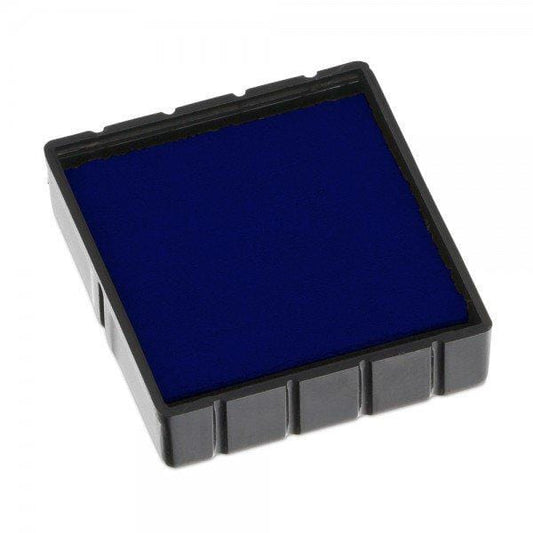
COLOP Replacement Ink Pad E/Q 24 – Single Pack
Regular price From 5,95 €Unit price € per -

Replacement text plate for COLOP Printer Q 24 – 24 × 24 mm
Regular price 8,95 €Unit price € per

